
Event and Personnel Manager
The definitive tool for professional event, personnel, and material management. Manage all your gigs from an intuitive and powerful interface.
Everything you need to manage your events
Discover how our software can simplify your daily management and improve your team's productivity.
Total Privacy (Local-First)
Your data is yours. Everything is stored locally in .gep files. Work without internet connection and without relying on cloud servers.
Conflict-Free Team Management
Assign technical and artistic staff safely. The system automatically alerts you if you try to assign someone who is already busy at another event.
Automatic Technical Sheets
Generate professional technical documentation (PDF) in seconds. Includes schedules, technical needs (sound, lights), logistics and contacts automatically.
Stock and Demand Control
Analyze the real availability of your material. The system calculates the daily demand peak to ensure you have enough stock for all simultaneous events.
Hybrid Integration with Google
BETAManage dedicated calendars for the app and view your personal agenda. Note: This feature requires manual authorization. Contact the developer to enable your Google account.
Open Source and Free
GPLv3 license. No subscriptions, no ads, and no hidden costs. Includes desktop application and complementary mobile version.
Ready to improve your event management?
Discover how the Event and Personnel Manager can simplify your workflow and save you hours of work.
tour.title
tour.description
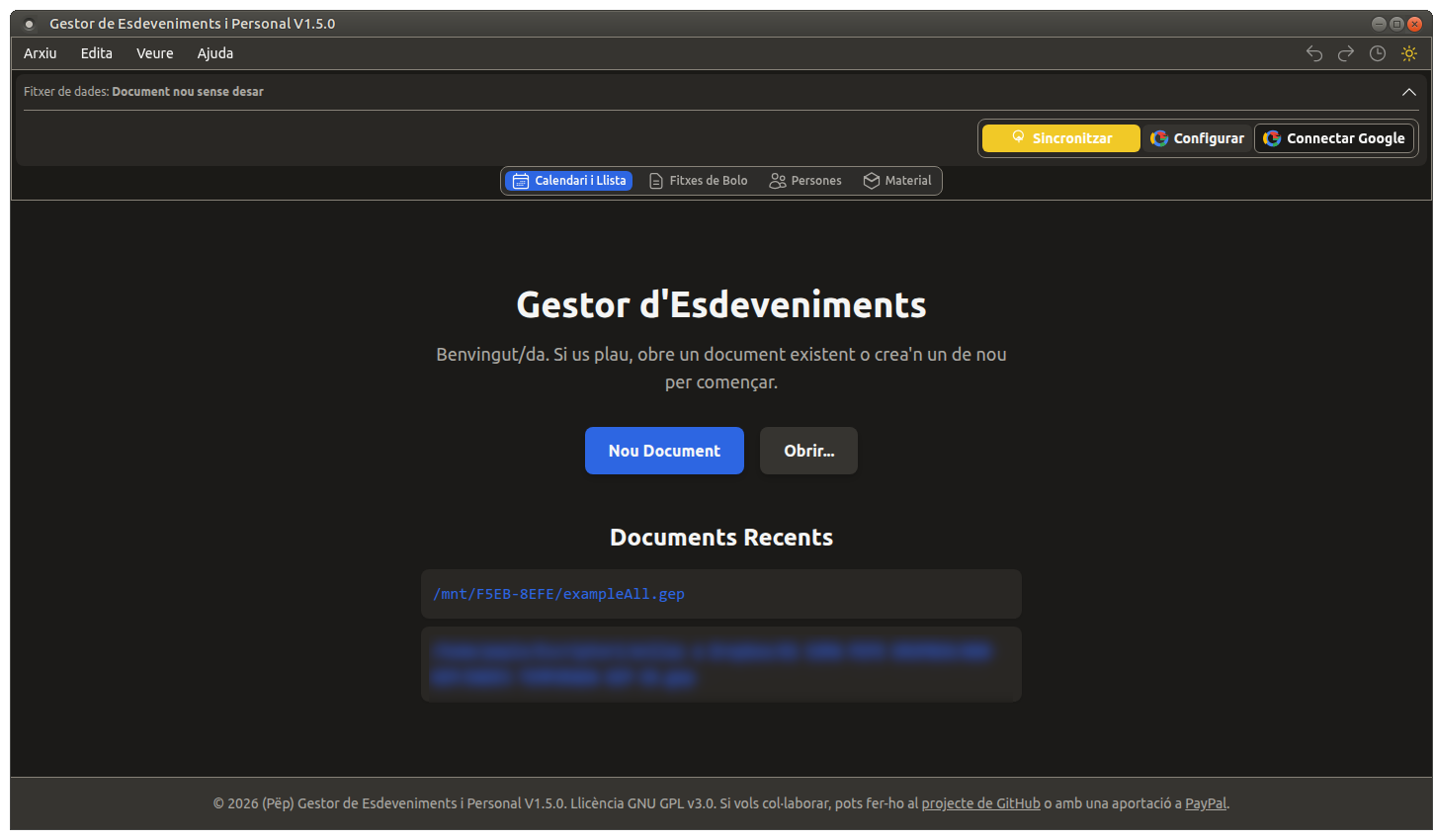
Welcome Screen
Start your project from scratch or open an existing document with just one click.
tour.features
- ✓Create new blank documents
- ✓Open existing .gep or .json files
- ✓Quick access to recent files
- ✓Intuitive and simple interface
Start your project from scratch or open an existing document with just one click.
tour.features
- ✓Create new blank documents
- ✓Open existing .gep or .json files
- ✓Quick access to recent files
- ✓Intuitive and simple interface
Discover the application
Explore the different screens and functionalities
carousel.loading_images
Available on all platforms
Choose your platform and start managing your events today. Fast, secure and easy to use.
Important information about versions
The Android version is a reduced version of the desktop application, designed for quick consultation and basic event management.
Main limitations of the Android version:
- Does not include all advanced features of the desktop version
- Optimized for mobile use with a simplified interface
For professional use with all features, we recommend using the desktop version (Windows, macOS or Linux).
📥 Installation Instructions
Windows
Available in two versions:
- Installer (.exe): Recommended for most users. Run the installation file and follow the instructions.
- Portable (.exe): Does not require installation. Run directly from a USB drive or folder.
Note: The application is not digitally signed. If Windows shows a warning, click 'More information' and then 'Run anyway'.
macOS
Available in .dmg format for modern versions of macOS:
- Download the .dmg file of the latest version
- Double-click the downloaded file to mount the disk image
- Drag the application to the Applications folder
- To open the application for the first time, right-click on the application and select 'Open' from the context menu
- Confirm that you want to open the application when the warning window appears
Important about security on macOS:
Since the application is not signed with an Apple developer certificate, you might see a message saying it cannot be opened. Here is how to resolve it:
Standard method (works in most cases):
- Right-click (or Control+click) on the application
- Select 'Open' from the context menu
- In the dialog box, click 'Open'
If the above method does not work (macOS Sequoia 15+ or 'Is damaged' error):
Option A (Settings): Go to System Settings > Privacy & Security, scroll to the bottom and press 'Open Anyway'.
Option B (Terminal): If it says the app is damaged, open the Terminal and run
xattr -cr /Applications/GestorEsdevenimentsPersonal.app
You will only have to do this the first time you open the application. From then on, you can open it normally with a double-click.
Linux
- Download the .AppImage file
- Give it execution permissions (Right click > Properties > Permissions > 'Allow executing file as program' or use 'chmod +x')
- Double-click to open the application or run it from the terminal
Portable Format
AppImages are 'all-in-one' portable applications. You can move the file anywhere (even on a USB) and the app will run without installation or administrator privileges.
Integration Tip
For a better experience (start menu icon, file association), we recommend using 'AppImageLauncher' to integrate the application into your system.
Note: On systems like Ubuntu 22.04+ it may be necessary to install first: sudo apt-get install libfuse2
Ubuntu 24.04 (Noble Numbat) and later versions have introduced a security restriction that prevents AppImage applications from starting. If the app doesn't open, you can fix it by enabling kernel permissions with this command in the terminal:
sudo sysctl -w kernel.apparmor_restrict_unprivileged_userns=0 Need another version?
Visit our versions page to download previous versions or other variants of the platform.
System Requirements
Minimum
- Dual-core processor at 2 GHz or higher
- 4 GB of RAM
- 200 MB of free disk space
Recommended
- 4-core processor at 2.5 GHz or higher
- 8 GB of RAM or more
- SSD with 500 MB of free space
Want to collaborate on the project?
This is an open source project under GPL v3.0 license. We encourage you to contribute or send us your suggestions.